
Free keyword research tool with a PDF report you keep
Enter a seed keyword, pick a country and download a report with up to 100 keywords. Each one comes with Google search volume, cost per click, search intent and keyword difficulty.
Enter a seed keyword
A word or a short phrase, and one of four countries.
We build the report
The seed keyword and up to 99 searches that contain it.
Download the PDF
No signup and no email address.
What the free keyword report includes
Three parts, in the order you need them. The pictures show a sample report for the seed keyword coffee grinder.
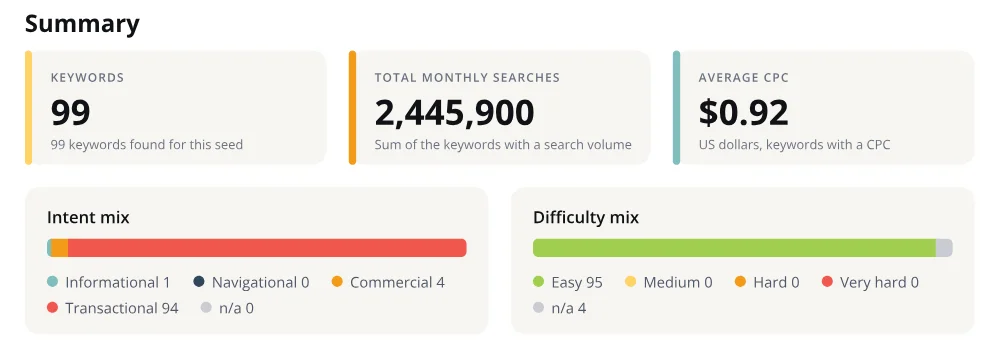
A summary of the whole list
How many keywords were found, their total monthly searches and the average cost per click. Two bars show the search intent mix and the difficulty mix, so you see in seconds if the topic is worth your time.
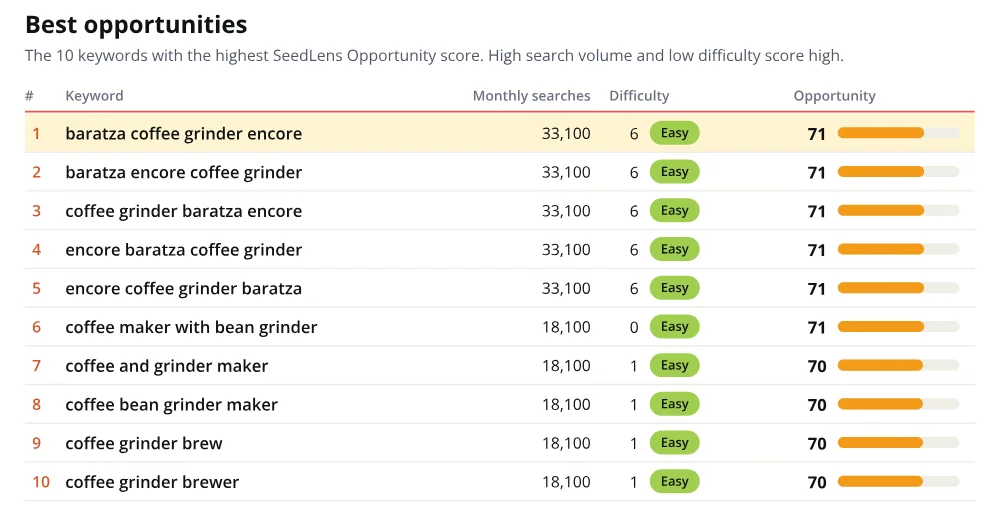
The 10 best opportunities
The Opportunity score is our own. It puts keywords with high search volume and low difficulty first, and the ten best open the report. Start your content plan here.
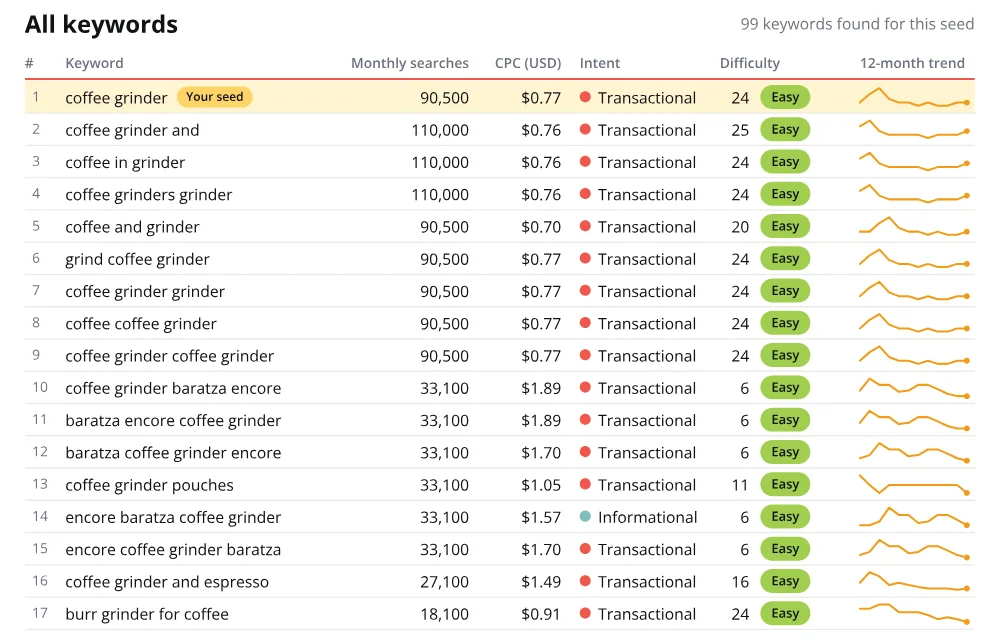
Every keyword with its numbers
Up to 100 rows, with the row of your seed keyword marked.
A long tail keyword generator with difficulty built in
Long tail keywords are longer, more specific searches built around a head term. Each one gets fewer searches, and many are easier to rank for.
SeedLens works as a free long tail keyword generator. It returns searches that contain your seed keyword, with words added before, after or inside it. Every report also works as a keyword difficulty checker, because each keyword carries its own score.
How to read keyword difficulty
How to do keyword research with your report
The report is a keyword idea generator for your next pages. Four steps turn it into a plan.
Start with the 10 best opportunities. They have the most searches for the least difficulty.
Read the intent. An informational keyword needs a guide, a commercial one a comparison, a transactional one a product or service page.
Choose by difficulty. A new site starts with Easy and Medium keywords and moves to Hard ones later.
Use the cost per click as a sign of commercial value, then write one page per keyword group.
What to do with your keywords
The report tells you what people search for. These are the next steps.
Track where you rank for these keywords
A Rank Check Report shows where your site ranks on Google for each of these keywords, on desktop and mobile. Repeat the check next month and every result lines up per keyword, so you see your rankings move.
Pay per report, no subscription.
Order a rank check reportSee what your competitor ranks for
Send one competitor's URL. Get their top Google keywords and their live backlinks in one report. Paid once, no subscription. Competitor Analysis Tool
Get new pages noticed faster
Published a page for one of these keywords? Submit up to five URLs at once to Google and more than 65 other search engines. Ping My URL
Find what a keyword is worth
Enter a keyword's search volume and CPC from this report, add your current ranking, and see the return to expect. SEO ROI Calculator
Who it is for
What it is not
Not a rank tracker. It shows what people search for, not where your site ranks.
One seed keyword and one country per report.
A PDF only. No spreadsheet export and no API.
Keyword Research Tool FAQ
Is this keyword research tool really free?
Yes. You get one report per month with no signup, no email address and no card.
How many keywords are in a report?
Up to 100, your seed keyword and up to 99 searches that contain it. When fewer exist, the report says how many were found.
Which countries can I choose?
United States, United Kingdom, Canada and Australia.
What is keyword difficulty?
A score from 0 to 100 for how hard it is to reach the top 10 Google results for a keyword. Higher is harder.
What is a seed keyword?
The word or short phrase you start from. The tool finds longer searches that contain it.
Can I check the search volume of one keyword?
Yes. Enter it as your seed keyword. Its own row is marked in the report, with search volume, cost per click, intent and difficulty.
How fresh is the data?
Every report prints the date its keyword data was last updated.
Why only one report per month?
Each new report buys fresh data, so we limit new reports per visitor and per day. That keeps the tool free.
Can I get the keywords as a spreadsheet?
No. The report is a PDF.
What do you keep about me?
A hashed IP address for 30 days, to give one free report per month. Your report is saved with its keyword and country, and it is not linked to you. A bot check by Cloudflare runs in the background. No name, no email, no account. Our Privacy Policy has the details.
How do I track my rankings for these keywords?
Order a Rank Check Report. It shows where your site ranks for each keyword on desktop and mobile.

Why onwardSEO
onwardSEO has worked in SEO since 2008, from Bucharest. SeedLens is built by the same team as our Rank Check Reports, led by Eugen Platon, with 16+ years of SEO experience.