

I’ve audited hundreds of websites since 2009, and one pattern never changes: heading tags are simultaneously the most over-discussed and most badly implemented element in on-page SEO. Clients arrive convinced that a second H1 tanked their rankings. Developers wrap logos in H1s. Content teams sprinkle exact-match keywords across every H2 like seasoning.
So I went back through the entire public record — every Google statement from Matt Cutts in 2009 to Gary Illyes in 2024, plus the controlled split tests that actually measured traffic impact. What follows is the evidence, not the folklore.

Are H tags a ranking factor? Google’s answer hasn’t changed since 2009
Headings are not a direct ranking factor. Google uses them to understand which text belongs to which topic — nothing more, nothing less. That’s the short answer, and Google has been remarkably consistent about it for 17 years.
The paper trail starts with Matt Cutts. In a March 2009 Google Webmaster Help video, he confirmed there’s no penalty for multiple H1 tags, though he advised using them sparingly — one, maybe up to three [1]. The only failure mode he flagged was absurd: wrapping your entire page in an H1.
Ten years later, John Mueller loosened the rope further. In his 2019 #AskGoogleWebmasters session, he said Google’s systems have no problem with one H1, multiple H1s, or even styled text with no semantic HTML at all [2]. In a separate Webmaster Central hangout, he explained that Google uses headings “to better understand the content on the pages” — as context for the text beneath them, not as a keyword scoreboard [3]. By 2023, he’d stated plainly that an H1 isn’t even mandatory for a page to rank [4].
Gary Illyes closed the loop in 2024: semantic heading order matters for screen readers, but from a Google Search perspective, using headings out of order doesn’t affect rankings [5].
Notice the trajectory. Google’s public position got looser over time — from Cutts’ “sparingly, maybe three” to Mueller’s “no limit, upper or lower.” Meanwhile, the industry standardized on exactly one H1. Both camps are right, and understanding why is the key to doing headings well.

Why do I still enforce one H1 per page?
Because “Google doesn’t penalize it” and “it’s the best choice” are two different claims. I enforce a single H1 on every client site for three reasons that have nothing to do with penalties.
First, accessibility. WebAIM’s screen reader survey found that 71.6% of screen reader users navigate long pages by headings first [6]. Multiple H1s break their mental map of the page. The HTML5 document-outline algorithm that was supposed to make sectioned H1s work was never implemented by any browser or screen reader — so the theoretical case for multiple H1s died in committee.
Second, the SERP safety net. Ahrefs studied 953,276 top-ranking pages and found that when Google rewrites your title in search results, it pulls the replacement from your H1 tag 50.76% of the time [7]. One clear H1 means you control what that fallback says. Three competing H1s means Google picks for you.
Third, discipline. A single H1 forces you to answer the question every page must answer: what is this page about? If you need two H1s, you usually need two pages.
As many as the page has genuine subtopics — no more, no fewer. I searched for an official number for years. It doesn’t exist. No Google document prescribes an H2 count. Google’s SEO Starter Guide says only to break long content into sections and provide headings to help users navigate [8]. Yoast, Ahrefs, and Semrush all describe the same convention — one H1, then H2s for main sections, H3s beneath them — without ever capping the count [9].
What we do have is test data, and it’s more interesting than any quota.
Semrush ran a controlled split test on 335 category pages where subtopics of the page’s main topic had been marked up as H3s instead of H2s. They promoted those H3s to H2s — nothing else changed. After 21 days: a 4.5% increase in clicks at a 99% confidence level, with impressions rising too, meaning the pages became relevant for more queries [10].
SearchPilot ran the mirror-image test for a travel client whose pages had no H1 at all. Converting the first H2 into an H1 produced a statistically significant 4.5% traffic lift — roughly 3,000 extra sessions a month across the template [11].
Read those two results together and the lesson is precise: the win didn’t come from adding headings or hitting a number. It came from making the heading levels match the actual topic hierarchy. When your structure tells the truth about your content, search engines reward you.

What changed in 2026: headings feed AI answers, not just rankings
Here’s where the last two years rewrote my playbook. Classic rankings are no longer the only game. Featured snippets, passage ranking, and AI-generated answers all extract content at the section level — and headings are the extraction anchors.
Google’s passage ranking, live since early 2021, lets a single well-structured section rank on its own merits, even on a page covering a broader topic [12]. Featured snippets follow a pattern I’ve replicated dozens of times: an H2 or H3 that matches the query, followed immediately by a 40–60 word direct answer.
AI search doubled down on this mechanic. Kevin Indig’s 2026 analysis of millions of chatGPT responses found that cited passages are roughly twice as likely to contain a question mark — and 78.4% of those question-tied citations come from headings [13]. His data also revealed what he calls the “ski ramp”: 44.2% of AI citations come from the first 30% of a page’s content. AI systems treat your H2 as the prompt and the paragraph beneath it as the answer.
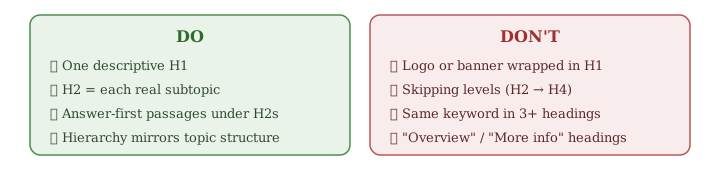
The practical consequence: every heading on your page is now competing for citation independently. A vague heading like “Overview” or “More information” is a section that will never be quoted anywhere.
My heading rules after all the evidence
This is the exact standard we apply at onwardSEO, distilled from everything above:
- One H1 per page. Descriptive, aligned with the title tag in intent, never the logo.
- One H2 per genuine subtopic. No quota. If someone read only your H2s, they should understand the whole page.
- H3s only where an H2 has real sub-points. H4s almost never — even 5,000-word guides rarely need them.
- Never skip levels. H1 to H2 to H3. It costs nothing and screen readers depend on it.
- Levels must match the topic hierarchy. A subtopic of the H1 gets an H2, not an H3. This is where the measured 4.5% lives.
- Primary keyword once in the H1, natural variants in H2s. The same exact phrase in three or more headings is a rewrite signal, not an optimization.
- Question-form H2s for sections targeting snippets or AI answers — with the answer delivered in the first 40–60 words below. Not every H2, or the page reads like a FAQ dump.
- Front-load your strongest sections. Nearly half of AI citations come from the first third of the page.
- Styling is CSS’s job. If you’re choosing a heading level for its font size, stop and add a class instead.
The mistakes I still find in almost every audit
Theory is settled; implementation isn’t. These four problems appear in the majority of the sites I crawl, and every one of them is a template-level fix that improves thousands of URLs at once.
The logo H1. WordPress and Shopify themes love wrapping the site logo or a decorative banner in an H1, which then competes with the real page heading on every single URL. Crawl your site, export the H1 report, and check what your homepage’s H1 says right now. On a shocking number of sites, it’s the brand name on every page — which tells Google every page is about the same thing.
The missing H1 on money pages. Shopify collection pages and custom homepage builders frequently ship with no H1 at all. The SearchPilot test above shows exactly what fixing this is worth: a measurable traffic lift from a one-line template change. In e-commerce audits, this is the cheapest win I know.
Styling-driven hierarchy. A designer wants smaller text, picks H4 instead of H3, and the document outline now skips a level on 800 pages. The content team never notices because it looks fine. Screaming Frog’s heading extraction or the Detailed SEO browser extension exposes this in minutes.
Keyword-stuffed H2 sequences. “Skip Hire London Prices,” “Cheap Skip Hire London,” “Best Skip Hire London” — three H2s, one keyword, zero information. Correlation data shows exact-match repetition in headings has no positive relationship with rankings, and it reads as machine-written to both users and, increasingly, to the AI systems deciding what to cite.
My audit routine is deliberately boring: crawl, export H1–H4 per template, run the outline test (do the headings alone read as a table of contents?), fix at template level first, page level second. Boring routines are the ones that get done.
The takeaway
After 17 years of Google statements and every split test I could find, the truth about H tags fits in one sentence: they won’t rank your page, but they decide what search engines and AI systems can extract from it. Stop optimizing headings as a ranking trick. Start writing them as the honest table of contents of your page — one H1 naming the topic, one H2 per subtopic, answers delivered immediately beneath. That’s the version of “heading SEO” that survived every algorithm since 2009, and it’s the one built for whatever comes after AI Overviews too.
If you’d like an audit of your site’s heading structure against these standards, get in touch with the onwardSEO team.
References
- Matt Cutts, “More than one H1 on a page: good or bad?” — Google Webmaster Help, YouTube, March 2009. youtube.com/watch?v=GIn5qJKU8VM
- John Mueller, #AskGoogleWebmasters: “Multiple H1 Tags” — Google Search Central, YouTube, 2019. Coverage: stanventures.com/blog/multiple-h1-tags
- John Mueller, Google Webmaster Central office-hours on how Google uses headings. Documented at: natzir.com — Headings h1-h6 for SEO and Accessibility
- John Mueller on H1 tags not being required, 2023. Documented at: natzir.com — Headings h1-h6 for SEO and Accessibility
- Gary Illyes on heading order and accessibility, 2024. Coverage: Search Engine Journal / Google SEO Starter Guide. developers.google.com — SEO Starter Guide
- WebAIM, Screen Reader User Survey #10, 2024. webaim.org/projects/screenreadersurvey10
- Ahrefs (Michal Pecánek), study of 953,276 pages on Google title rewrites and H1 usage. ahrefs.com/blog/h1-tag
- Google Search Central, SEO Starter Guide. developers.google.com — SEO Starter Guide
- Yoast, “Why you only need one H1 heading per post or page.” yoast.com/one-h1-heading-per-post; Ahrefs, “Header Tags” glossary. ahrefs.com/seo/glossary/header-tags
- Semrush, “SEO Split Test Result: How to Use Headings Effectively” (SplitSignal, 335 pages, +4.5% clicks, 99% confidence). semrush.com — SEO Split Test Result
- SearchPilot, “Does Changing an H2 to an H1 Improve Organic Traffic?” (+4.5% organic traffic). searchpilot.com — case study
- Google, “Understanding passages in Search” announcement and rollout confirmation, 2020–2021. blog.google — Search On
- Kevin Indig, “The science of how AI pays attention” — Growth Memo, February 2026 (analysis of ChatGPT citations; question-mark and content-position findings). growth-memo.com

Eugen Platon
Latest posts by Eugen Platon (see all)
- H Tags in SEO: What 17 Years of Evidence Taught Me About Heading Structure - July 21, 2026
- Pinger Tool v1.3.0 Is Here – Faster, Safer, and Built for Reliable Indexing Pings - December 19, 2025
- How to Calculate SEO ROI in 2025 – Step-by-Step Guide Plus Free SEO ROI Calculator - November 17, 2025
- Enterprise SEO ROI Calculator – Turn Thousands of Keywords Into a CFO-Ready Business Case - November 15, 2025